As you have undoubtedly noticed, we released ActivityInfo 5.0 on January 13th, with the new interactive table at the center of the changes.
We are incredibly excited to reach this major milestone in ActivityInfo’s development. This update is one of our biggest yet, representing more than a year of development focused on making data entry more fluid, intuitive and interactive.
Our goal was to have the flexibility of a worksheet combined with the robust validation and drafting features. This allows you to interact with your data just as you would in a spreadsheet, but with the power of a relational database.
Interactive Table
-
Add and edit records directly in the table by allowing cell editing for all field types
-
Add new rows anywhere in the table and draft records
-
Create draft edits to existing records and see clear differences between your draft and the committed values in the record panel before saving
-
Monitor record status (valid, invalid, locked, etc.) in real-time as you work
-
Pin columns to keep your view organized and enjoy significantly improved sorting and filtering
-
Filter forms based on record status
-
Copy and paste values seamlessly between ActivityInfo and external spreadsheets
-
Fill-down copy values by dragging the fill handle present on cell selection
-
Tool tips when hovering cells for displaying full cell content when value is not fully visible, indicate validation errors, read-only and calculated values. Tool tip displays more information for record status validity
-
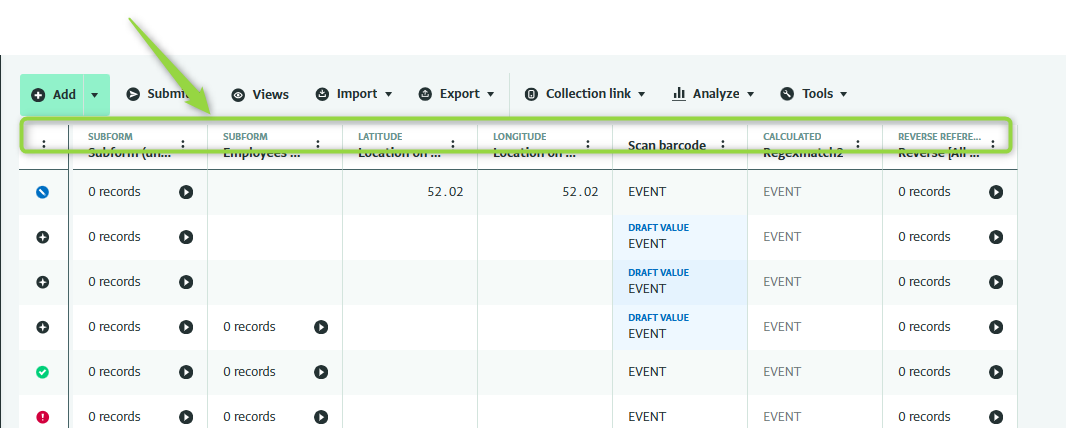
Indicating calculated fields, geographic, subforms and reverse reference fields in the column header
Matrix Entry View
- Data entry interface designed for high-dimensional indicators, such as quantities disaggregated by Sex, Age, and Disability Disaggregated Data (SADDD)
Data entry
- See clear differences between your draft and the record values in data entry when editing committed records with drafted values
Record panel
-
New buttons that allow submitting, discarding draft values and clearing field values.
-
Merge records together even when subform contains committed and draft records via the record panel.
-
Edit button in details pane for each editable field that will jump to edit field in data entry interface.
-
Clear icon indicators when fields are hidden in table display or the value is not editable
-
Detailed feedback for each field on validation errors
-
Display of calculated fields
Fixes and improvements
- This update came with a lot of improvements and changes, and also addressed a large number of issues
Latest patches and updates
- Since the initial rollout of Version 5.0, we have released a series of patches to address the most important areas
We’ve spent a significant amount of time fine-tuning these features post-launch to ensure they handle your databases smoothly. While we’ve made great strides in performance, we are still actively monitoring and optimizing the system.
Your feedback during this period is invaluable. If you notice anything that doesn’t feel quite right, or if a specific workflow feels slower than usual, please let us know. We are committed to making this the fastest, most reliable version of ActivityInfo yet.
Check out the full documentation here:
https://www.activityinfo.org/support/docs/working-with-data/interactive-table.html
https://www.activityinfo.org/support/docs/working-with-data/matrix-view.html
Finally, we would like to thank UNOCHA and Data Friendly Spaces for their collaboration in the design and testing of the interactive table and matrix, and for financing the initial phase with support from USAID.