Hello dears,
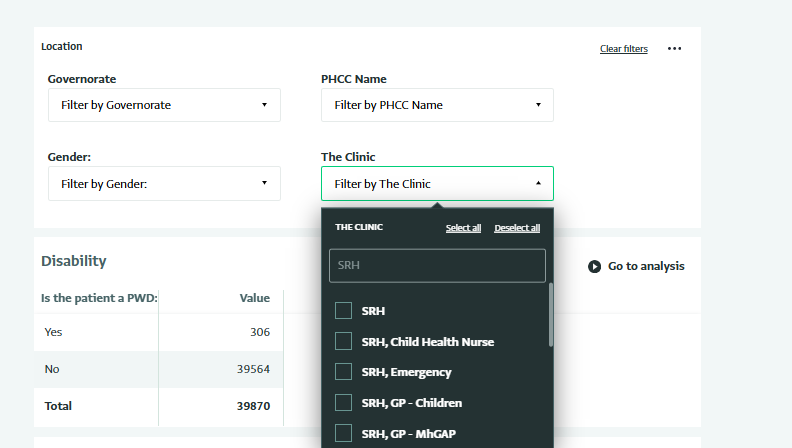
Is there anyway to add multiple chooses to the Slicer option in the dashboard without showing, or adding the duplications, I have need to add the main chooses.
Hi! Thank you for your question.
Although I’m not familiar with your specific form, if you currently have one column containing the main “SRH” category and another column containing the detailed options (such as “Child Health Nurse,” “Emergency,” etc.), you can use both columns to create a cascading slicer.
This way, users can first select the main category “SRH,” and then choose from the related sub-options without showing duplicate entries in the slicer.
You can find more information on this link: Understanding Slicers - ActivityInfo: information management software for M&E, reporting and case management
Best regards,
Zeila
Hi
Thanks for your comments and reply.
I want to mention that SRH is not a main category. it is the same of child health nurse, and emergency.
imagine like follows: a patient can visit multiple clinics:
column “clinic” is multiple with the following
We want to have a slicer with a unique clinics.
Hi,
Thanks for clarifying. If I understand correctly, the information displayed is likely coming from a multiple selection field. In that case, you can transform the data by creating a calculated table that separates each selected option into its own row.
You could use a formula like the following:
UNION(
selectcolumns(formcode,
"Clinic",IF(ISNUMBER(SEARCH("SRH", clinic)), "SRH")),
selectcolumns(formcode,
"Clinic", IF(ISNUMBER(SEARCH("Child Health Nurse", clinic)),"Child Health Nurse")),
selectcolumns(formcode,
"Clinic", IF(ISNUMBER(SEARCH("Emergency", clinic)),"Emergency")))
This formula works by checking whether each option (“SRH,” “Child Health Nurse,” or “Emergency”) is contained within the clinic field. It then creates separate rows for each matching option, effectively “unpacking” the multiple selection field into distinct entries.
Hope this helps!
Warm regards,
Zeila
Hi,
We have identified an issue with the slicer when multiple-selection fields are used. It should display only the distinct options from the multiple-selection field, but instead, it currently shows all possible combinations of options found in the form records. However, selecting a single option from the slicer still applies the correct filter to the report.
We have raised a ticket to address this issue and will share an update once it’s resolved.
Best regards,
Metawee
Hello everyone,
We have just released a new version that includes the fix for the issue with the slicer selection for multi-selection fields.
Check more details here: 4.0 Build 3507 Released!
Thank you,
Andrei Galusca