Interactive Table

We’re getting ready to launch an updated version of the Table in ActivityInfo that will support in-line editing, filling down cells, copying, pasting and more features you would expect of a spreadsheet.
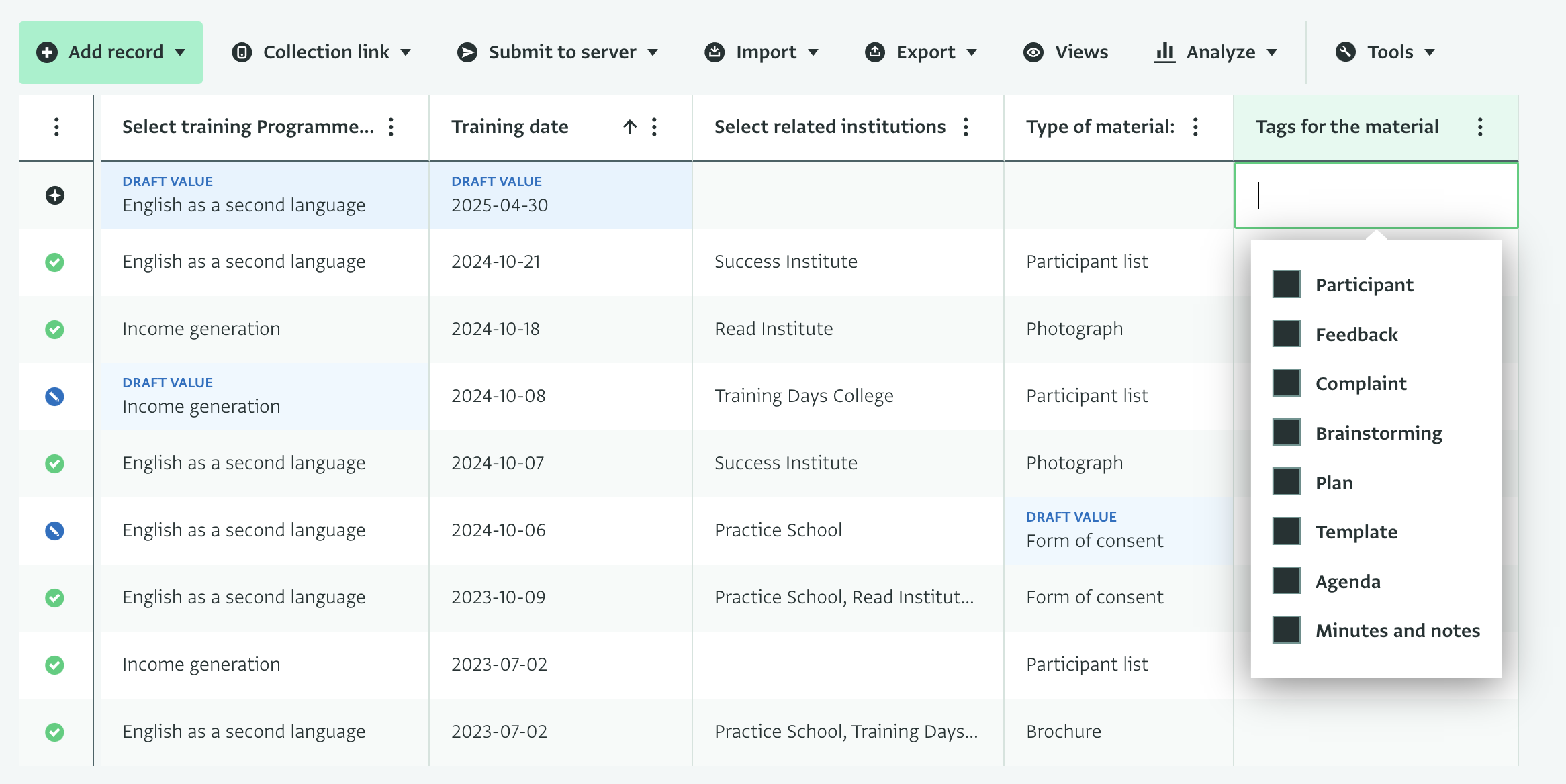
Despite being a powerful tool, Excel and spreadsheet-based software haven’t been designed to work as databases or hold large amounts of data. Validating data, enforcing rules, collaborative data editing and scaling up to managing and editing long datasets are too challenging tasks for this type of tools due to their underlying mechanics.

On the other hand, the simplicity in which you can copy, move, fill down and work with the data has been considered a unique advantage of their nature. For this reason, we’ve been working on enhancing the data entry options in the platform.

Last month we gave a tour of the new feature in a webinar (watch recording).

You can preview this spreadsheet-based data entry here: https://preview.activityinfo.org
Please note that this version is connected to the production environment so any changes you make will apply to the live data.

Please share your feedback here!

4 Likes

Hello all,

Thank you for all of your valuable feedback on the inline table over the past few weeks. It is great to see the feature in use and bringing positive changes to your workflows. We have been hard at work responding to this feedback, and I would like to share an update on our progress looking ahead to our production release.

Major bug fix update
This week, we released a major update to the inline table preview including bug fixes for blocker and high priority issues. These fixes are now available in preview build 16 or later. We continue to work on resolving the remaining issues before we go live with our production release. A full table of issues is included below.

Optimisations
Additionally, we have been using anonymized datasets to profile performance of the inline table in real-world forms. From this profiling, we have been working on a set of optimisations to bring the more complex queries of the inline table to an acceptable performance level.

The first batch of these optimisations is complete, and we hope to release these changes to the inline table preview in the coming week.

However, some performance bottlenecks still remain, and we continue to work on additional optimisations to resolve them. Should you find some of your forms are slower than anticipated, please reach out to support@activityinfo.org with the details.

Thanks again for your feedback.

Inline table work: ongoing and released

Issue Summary Priority Status
AI-5501 Attachment files no longer displayed in the record panel Blocker Released
AI-5638 Formatting is broken on last edit time column Blocker Released
AI-5656 Ensure consistent presentation for non-editable values in cells Blocker Released
AI-5657 Parent column values in subforms are not autocompleted when adding new rows in subforms Blocker Released
AI-5668 Copy to clipboard modal is crashing when selecting a lot of rows including the record status column Blocker Released
AI-5670 Do not evaluate calculated fields in referenced forms if the reference field is blank (e.g. CONCAT() function) in data entry or inline table Blocker Released
AI-5690 Field translations are not displayed in the reference dropdown Blocker Released
AI-5697 Draft subrecords can be lost via data entry when editing an submitted parent record Blocker Released
AI-5700 Calculated fields in subforms set as unique that point to parent or reference fields are crashing inline table display Blocker Released
AI-5708 Subform table display crashes due to parent pending serial numbers Blocker Released
AI-4759 User has delete permission removed and can no longer resolve invalid subrecords High Released
AI-5696 Parent reference fields that point to the subform keys are crashing the inline table display Blocker In Progress
AI-5543 Deleting new rows in subforms returns a 400 error and the deletion screen remains on screen Blocker Backlog
AI-5495 Print screen for a record with draft values will display only the draft values Blocker Backlog
AI-5715 Form table display crashes when there is an invalid reference in the form design Blocker Backlog
AI-5552 Submit to server modal is flickering High Backlog
AI-5625 Users without view permissions do not see all buttons and details in record panel for their drafted records High Backlog
AI-5635 Keyboard cell navigation and editing is not working properly after selecting options in a cell dropdown menu High Backlog
AI-5639 Drafting subrecords in subforms with relevance rules is counted as invalid for users without view permissions High Backlog
AI-5640 Add rows button is active in subforms for users without the right permissions High Backlog
AI-5684 Multi selection is not properly handled when the mouse pointer goes outside the table display High Backlog
AI-5709 Wrong error message displayed on subform table when users role contains editing filters or editing conditions High Backlog
4 Likes

Hello all,

I am pleased to announce that this afternoon we released Version 5.0-b18 to the preview service. This release includes significant optimisation work for the inline table to bring it to an acceptable level of performance, as well as a number of other fixes. Your feedback over the last few months and the use of anonymized datasets has been instrumental in tracking down the key performance bottlenecks on the inline table. Thank you again to everyone who has provided feedback.

However, as the new inline table is much more demanding, more work is required to bring the inline table in offline mode to an acceptable level of performance before a general release to production. Over the course of the next few months, we will be focusing our work primarily on improvements to inline table performance in offline mode.

In the meantime, we will also be releasing regular fixes and usability improvements to the inline table. And of course, I will continue to provide regular updates on our progress here.

Thanks once again for your positive support on this development, and your continued engagement and feedback. Should you have any performance issues or experience any bugs in the meantime, please reach out to support@activityinfo.org with the details.

1 Like

Hello! Any thoughts on when 5.0 will be going live? Sorry if I missed an announcement. Thank you.

Hi Shirin (and everyone else),

The headline: this morning, we had a meeting to review all open issues and feedback that we’ve received, and have chosen Tuesday, January 13th, 2026 as our go-live date!

Although we are on-track to close all blocking issues by the end of this week, we decided to pick a release date after the December holidays to ensure that everyone has enough time to prepare their users for the change, and that our own team will be at full strength to support the change management process.

We also heard from some of you who were personally very enthusiastic about the new interactive table, but weren’t sure all of your users were ready for it. We heard concerns that novice or occasional users would be more likely to introduce errors or mistakes given how easy the interactive table makes editing.

For this reason, we’re going to be making “interactivity” an opt-in feature to start.

image.png

This way, you can turn on “interactive mode” for yourself, or save a default shared view for your team if you want this to be on for everyone by default for specific forms.

We’ll be collecting feedback during the first quarter of next year and may make the interactive default in the future, but hopefully this will give you time to help your users transition at a pace that makes sense for your teams.

The switch will be release to https://preview.activityinfo.org shortly.

And of course, if you want to switch earlier than January 13th, don’t hesistate to switch yourself or your team to the preview version at any time!

I hope this strikes the right balance, but as always, keen for your feedback.

Alex

1 Like