Hello,
I am building a proof of concept for an annual education data collection using a parent form with an Education Results subform.
Each Education Results record should be uniquely identified by:
-
Indicator
-
Education level
The same record contains three quantity fields:
-
Male
-
Female
-
Submitted total
I configured a Matrix View with:
-
Rows: Indicator
-
Columns: Education level
-
Measures: Male, Female and Submitted total
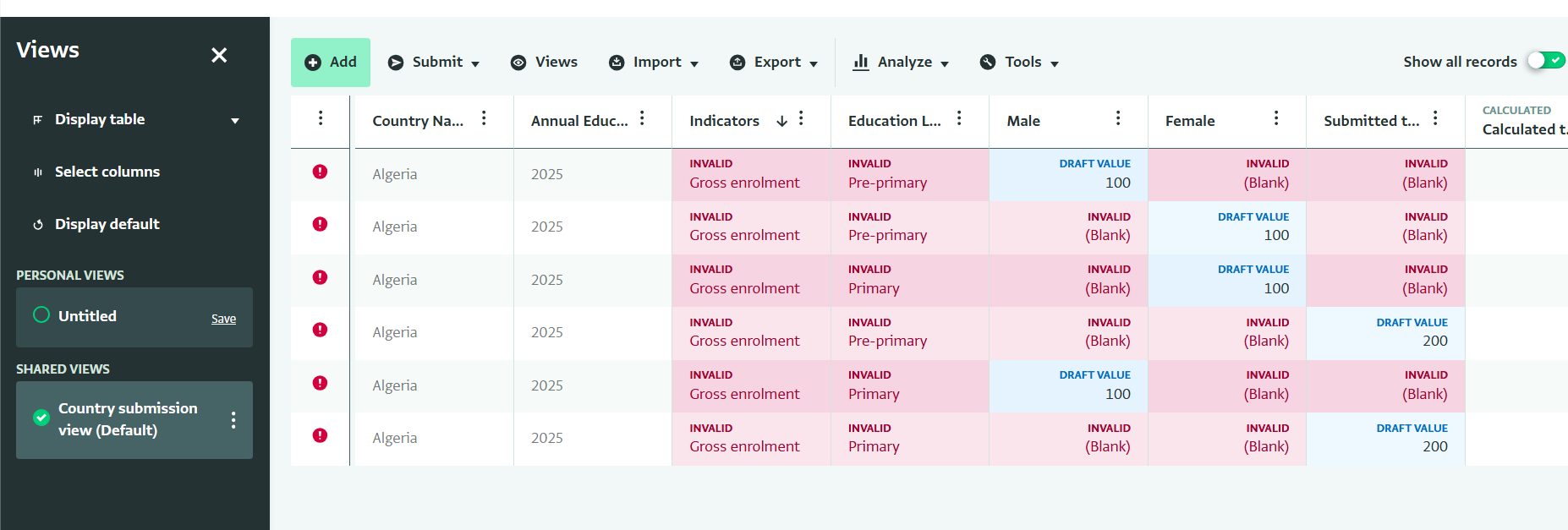
The Matrix View looks correct during data entry. However, when I return to the standard Table View, ActivityInfo has created separate partial draft records for some cells instead of updating one record. This generates invalid records and therefore submission of records cannot be completed.
For example, for the same key combination:
Indicator 1 × Secondary (Education Level 1)
I see three draft records:
| Indicator | Education level | Male | Female | Submitted total |
|---|---|---|---|---|
| Indicator 1 | Secondary | 100 | blank | blank |
| Indicator 1 | Secondary | blank | 100 | blank |
| Indicator 1 | Secondary | blank | blank | 200 |
These records are then marked invalid because they have duplicate keys and missing required fields. As a result, the drafts cannot be submitted, even though the Matrix View appears complete.
My expectation was that entering the three measures in the same Matrix View intersection would create or update a single underlying record:
| Indicator | Education level | Male | Female | Submitted total |
|---|---|---|---|---|
| Net enrolment | Secondary | 100 | 100 | 200 |
Is this expected behaviour, a configuration issue, or a limitation/bug in Matrix View when creating new records with multiple measures?
There are some screenshots:
Matrix view:
Table view :
I would also be interested to know whether the recommended approach is to pre-create all Indicator × Education level records before using Matrix View for data entry.
Thank you.