Hello dears,
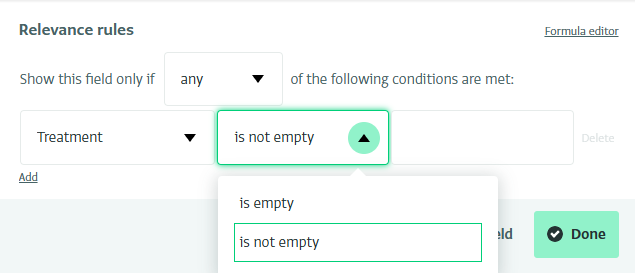
I have a question about set relevance rules for multiple reference. I have tried to add a text field with relevance rules to one of the choices in multiple reference, but it seeem that I can’t, it show two option only, (field is empty, is not empty) and can’t add any inputs in the right table, So I need to add set relevance rules for multiple reference for one of the reference choices.
Any updates dear @Alex
Hello Almotasem,
Hope all is great! 
Well, there’s no straightforward way to do this since Multiple Reference is still in Beta. However, you can achieve it using the formula editor with the following formula:
ISNUMBER(SEARCH(“Option A”, TEXTJOIN(“,”, TRUE, [Multiple Reference].[Field Code])))
Step-by-step explanation:
-
TEXTJOIN(“,”, TRUE, [Multiple Reference].[Field Code])
When choosing multiple answers (like “Option A, Option B, Option C”).
This part takes all the selected answers and combines them into one line of text, separated by commas.
Example: If they picked A and C → it becomes “Option A, Option C”. -
SEARCH(“Option A”, …)
This searches inside that text for the words “Option A.”
If “Option A” is found, the search returns the position (like “I found it starting at character 1”). -
ISNUMBER( … )
Since a search gives a number when it finds something, and an error when it doesn’t…
ISNUMBER simply translates that into a clear Yes/No.
If the search result is a number → TRUE (yes, “Option A” is there).
If it’s not a number → FALSE (no, “Option A” wasn’t selected).
Hope this helps!
3 Likes
Good Morning Firas, I have tried but it doesn’t work, do you have any alternative plan?
Thanks a lot, Appreciated your support.
Hmm, It should be working unless it was implemented incorrectly. I’m happy to jump on a quick call and sort it out together. If that works, please use this link to schedule a time: LINK
1 Like