Hello dears,
Let us said that I have multiple reference field, and I want to change the Referenced form, So what I have found:
- I still can’t change the Referenced form for the same field.
- I have created another field with with the new referenced form and deleted the old one.
- The Referenced form has been updated so some inputs has been deleted.
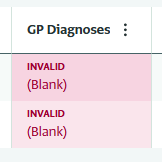
The issues that I have found that all the forms become Invalid with blank inputs because the inputs was in the old Referenced form.
My inquiries, If i want to update reference from like Add / Delete / Modify inputs will effect all the linked records, what is the best way to keep the records with the old inputs and use the new updated reference from?
Thanks in advance.
Hello Almotasem,
You cannot change the referenced form of an existing reference field in ActivityInfo, so creating a new reference field is the correct approach if you need a different structure. However, linked records should not become invalid simply because they are referenced, since ActivityInfo prevents you from deleting records that are still in use. Records only become invalid if the entire referenced form is deleted; in that case, the issue appears in the form designer (and possibly in custom views), rather than simply as invalid values in the interactive table.
If you need to manage outdated reference records, there are safer alternatives to deleting them. Instead of deleting records, you can mark them as inactive and use a validation rule to prevent users from selecting inactive records in new data entry. You can also hide the old reference field from the data entry form and from table views to avoid confusion while preserving historical data. For a deeper explanation of how this works, you can refer to the article on referential integrity:
https://www.activityinfo.org/support/docs/working-with-data/understanding-referential-integrity.html.