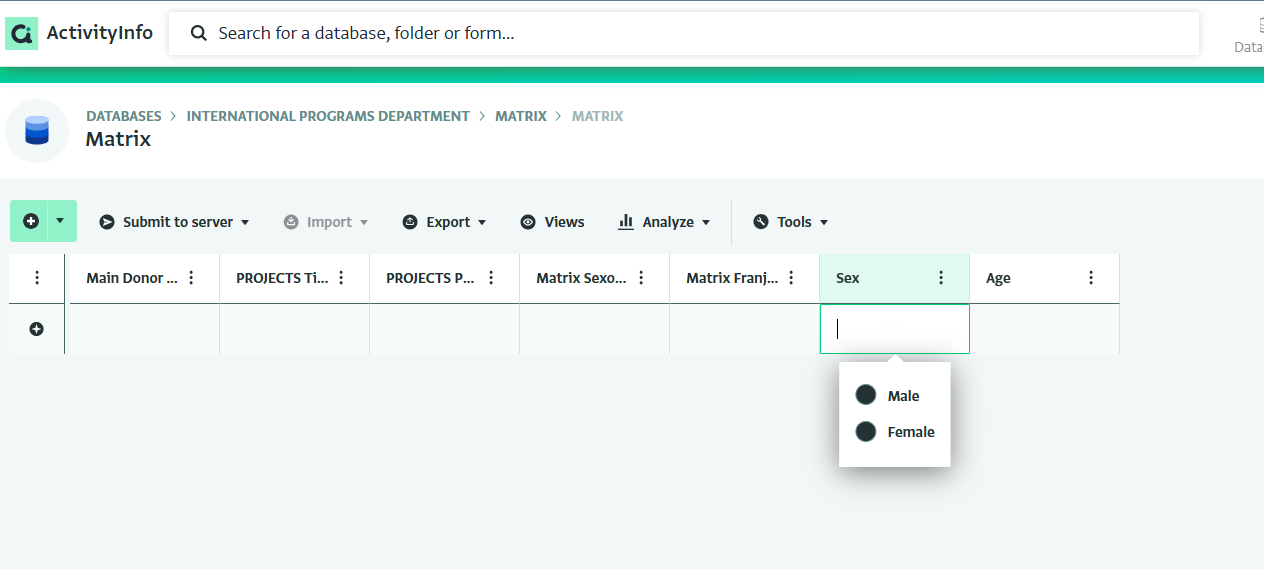
Matrix data entry view

The matrix is a new form view, currently available in the preview version. It is intended to support collection and management of highly-disaggregated indicator values. This feature has been sponsored by OCHA as part of the Global 3W project.
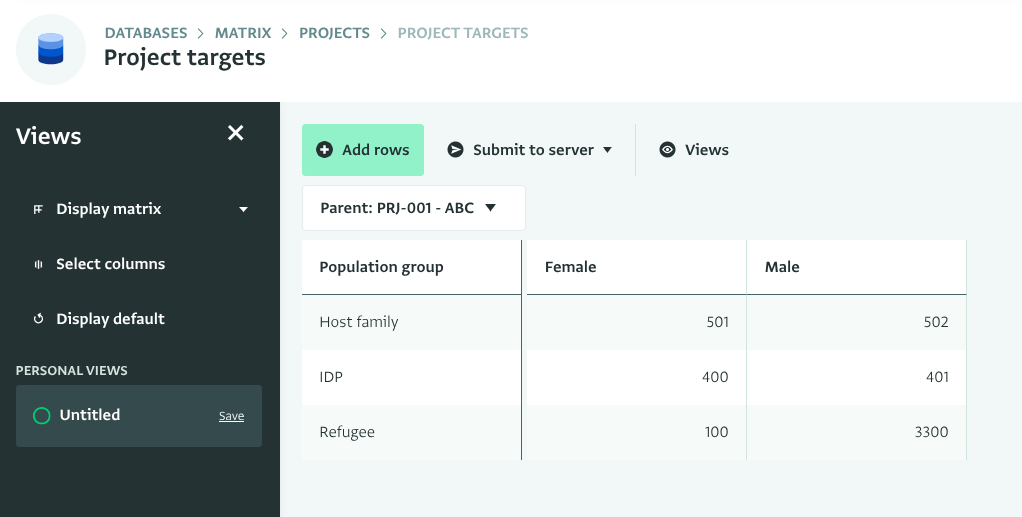
In monitoring results from partners, clusters (or consortia, donors, programmes, etc) often need to collect data on 10+ indicators, each of which may be disaggregated by location, sex, age, disability, refugee status, and other categories.

Currently in ActivityInfo this can only be addressed by asking partners to provide multiple records, one for each combination (the “long” approach), or by adding many fields to a form, e.g. “# of individuals receiving kits - Women”, “# of individuals receiving kits - Men”, the “wide” approach.

Both options are unsatisfactory in terms of the time required by partners to complete data entry, the quality of data provided, as it can be difficult to review data spread out over multiple records or across a very long data entry form. Using the “wide” format also complicates analysis because the system doesn’t have any information about the relationship to a quantity field named “Girls (0-18)” and the sex and age group.

Therefore it is desired to add a new data entry interface that will allow form designers to use the analysis-friendly long format for disaggregation, while allowing reporting partners to enter the values directly in a convenient matrix. The new interface, a Matrix Form View, would be implemented as a new display type for form views, alongside the existing Table and Map display types.

You can read the full specification for all the details. Documentation is still in progress.

But the important thing is to design your form for this view. It must have:

  • One or more single select or reference fields. The matrix view doesn’t (yet) support keys of other types.
  • One or more quantity fields.

A simple example could be a form with the following fields:

  • Indicator (reference field key)
  • Sex (single select key)
  • Population type: IDP, Refugee, Host family (single select key)
  • Target (quantity)
  • Achieved (quantity)

Give it a try in the preview environment and let us know how it works (or could work) for your data!
4 Likes

Hi Alex. With the example you gave, the matrix works perfectly (although the ‘custom lookup’ of the references is not reflected in the matrix and I cannot delete ‘row dimensions’). I have two questions about this

  1. Does this also work with the ‘wide approach’? We have several forms designed this way and I am not sure if they can be converted to a matrix.

  2. If not, the question is: can the matrix work in a subform? I say this because let’s imagine that I want a record for each project I run and for each project I want to know the number of beneficiaries by type, gender and age. If I had to add a record for each different quantity, choosing the gender, type and age, I would have many records for a single project. The matrix could work very well as a ‘beneficiaries’ subform, in which case we could break them down within each project.

Hi Emanuele,

Regarding your first point, if you have a form that breaks the disaggregations out into many fields (e.g. “# of Women - Under 18 - Urban”, “# of Women - Over 18 - Rural” etc., then you would need to redesign your form to use the matrix view.

But you can definitely use the matrix view for a subform, in exactly the way you described. We’ve got a few fixes coming to the preview environment to support effectively using the parent form as a dimension.

And yes – there is currently a bug with custom lookups in the preview version – this should also be fixed this week.

cc @nickimboden

1 Like

Hi everyone, happy Friday!

We’ve released an update to preview.activityinfo.org. In build 16, you can find the following updates and bug fixes to the matrix entry feature:

  • You can now select multiple measures in the matrix. If there is more than one measure, the name of the measures will appear as seperate columns.
  • Matrixes are now much easier to use with subforms: the parent will always be represented by a single dimension based on the parent’s record label, no matter how many keys your parent has.
  • Custom lookups for reference fields are now fully supported, so if you add two custom lookups for a reference field, each lookup will appear in the matrix as a seperate dimension. @emanuele.lini_medico
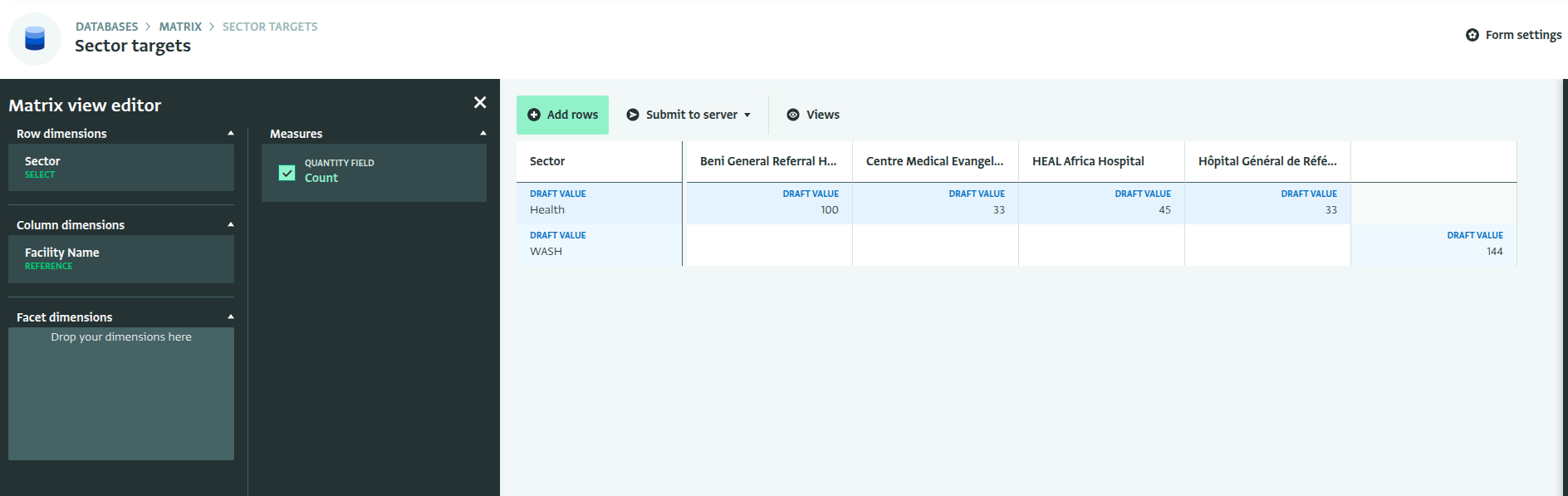
  • Optional keys with relevance rules are almost supported, there’s still some work to be done here, but if you put an optional reference key on the column axis, there will be an extra “blank” category. See the screenshot below where Health cluster targets are disaggregated by facility, but the WASH targets are not:

Still to do:

  • Fixes for the side panel
  • Proper validation of cells and row dimensions
  • Interaction between facets, columns, and relevance rules and validation rules
  • Documentation

Looking forward to your feedback!

3 Likes

Thanks Alex!! Excellent work!! :heart:

Hi Alex

I’m trying to use the preview with subform but it doesn’t work properly. Or better said… sometimes works and sometimes not… Plus, even when some record has been introduced, is not possible to use the matrix view… Is there a bug?

1 Like

Hi again. It is possible to have automatic totals by rows and colunms (or select them in the Matrix view editor)?